
UI/UX & Product Design
UI/UX design that makes
digital products easier to use.
We turn ideas, complex workflows and business requirements into clear digital experiences — from user flows and wireframes to polished interfaces, prototypes and scalable design systems.
Figma • Web UI/UX • Mobile UI/UX • Product Design
01 / Transparent pricing
Design packages
for every stage.
Clear starting scopes for a single idea, an MVP, a fuller product or ongoing iteration. Every package routes to a scope conversation; no fake checkout is used.
Kickstart Your Idea
$75
- ✓1 web page / 6 sections or 1 mobile screen
- ✓UI design
- ✓Editable source file
- ✓Unlimited revisions
Build Your MVP
$375
- ✓5 web pages / 6 sections each or 5 mobile screens
- ✓UI design
- ✓Editable source file
- ✓Unlimited revisions
Launch Full Product UI/UX
$750
- ✓10 web pages / 6 sections each or 10 mobile screens
- ✓UI design
- ✓Editable source file
- ✓Unlimited revisions
Ongoing Design Support
$40/hour
- ✓Product and interface iteration
- ✓Flexible ongoing scope
- ✓Figma-based design support
- ✓Scope agreed before work begins
Package structure and figures follow NexSolve’s current public design offering. Final scope is confirmed before work begins. View design profile ↗
02 / Capabilities
What we design.
Interface work shaped around how people find information, make decisions and complete important tasks.
Web Interfaces
Landing pages, marketing websites and complex web experiences.
Mobile Apps
Clear, intuitive interfaces for mobile products and workflows.
SaaS & Dashboards
Data-heavy products made easier to understand and use.
Product UX
User flows, information architecture and interaction patterns.
Design Systems
Reusable components and visual rules for consistent products.
Prototypes
Interactive prototypes for testing, communication and handoff.
03 / From idea to interface
From first flow to
final interface.
Good product design connects the reason a product exists with the way each screen behaves.
We begin by understanding the product and the people using it. Then we define journeys, organize information, establish hierarchy, design the interface, connect key screens into a prototype and prepare the files for implementation.
- 01Understand the product and its constraints
- 02Define user journeys and information structure
- 03Design, prototype and refine the interface
- 04Prepare organized, development-ready files
04 / Design approach
How we approach
product design.
Four principles keep the work useful, coherent and ready to move forward.
Clarity First
We simplify complex information and workflows so users know what to do next.
User-Centered
Interfaces are shaped around real users, goals and context.
Systematic
Reusable components and patterns keep products consistent as they grow.
Development Ready
Design decisions are organized and documented for practical implementation.
05 / Process
Six steps. One clear
design direction.
Choose any stage to see what happens and what it establishes. Every step remains accessible with a keyboard.
Step 1 of 6
Discovery
Understand the product, users and business goals.
Step 2 of 6
UX Structure
Map flows, information architecture and key interactions.
Step 3 of 6
Wireframes
Establish hierarchy and layout before visual polish.
Step 4 of 6
UI Design
Create high-fidelity interfaces and visual systems.
Step 5 of 6
Prototype
Connect key screens into realistic interactions.
Step 6 of 6
Handoff
Prepare organized files, components and guidance for development.
06 / Deliverables
What’s included.
The selected package defines scale and timing. The deliverables below show the legitimate design outputs available across UI/UX engagements.
View design pricing →- 01✓User flows
- 02✓Wireframes
- 03✓High-fidelity UI
- 04✓Responsive layouts
- 05✓Mobile screens
- 06✓Interactive prototypes
- 07✓Design system and components
- 08✓Editable source files
- 09✓Developer handoff
- 10✓Revision rounds according to the selected package
07 / Selected Design Work
Publicly listed
design work.
These publicly listed projects form part of NexSolve’s design experience and reflect the studio’s UI/UX capability since 2022.
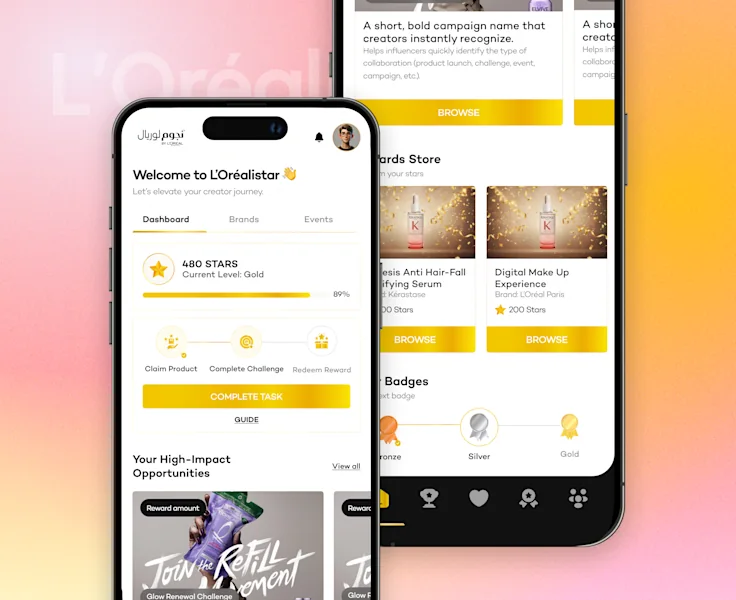
L’Oréalistar rewards platform
Mobile-first rewards, creator dashboard and branded interface design.
View case study →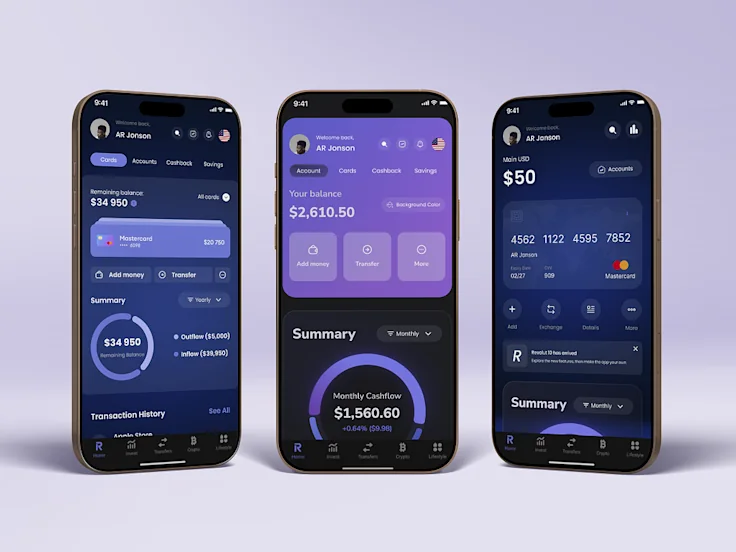
Revolut mobile app concept
Publicly listed mobile finance interface concepts exploring distinct visual directions.
View public source ↗08 / Quality standards
What good UI/UX
means to us.
Clarity
Every screen should make the next useful action easier to understand.
Consistency
Patterns repeat with purpose so the product feels dependable.
Hierarchy
Content and controls guide attention in the right order.
Accessibility
Contrast, focus, structure and interaction states are considered from the start.
Responsiveness
The experience adapts around the task instead of shrinking a desktop screen.
Scalability
Components and rules give the interface room to grow without visual drift.
09 / Good fit
Who is this service for?
For teams that need a clearer experience, a stronger product foundation or a practical path from idea to implementation.
Startups
Shape an early idea into a focused experience investors, users and developers can understand.
SaaS Products
Make complex workflows, roles and data easier to navigate.
Ecommerce
Create clearer discovery, decision and purchase journeys.
Mobile Products
Design touch-first flows around the tasks people need on the move.
Established Businesses
Modernize customer experiences while respecting existing operations.
Product Redesigns
Identify friction and create a more coherent direction for an existing product.
10 / Questions
Frequently asked
questions.
Straight answers about scope, tools, revisions and delivery.
01What’s included in a UI/UX design project?
The exact scope depends on the selected package or custom agreement. It can include user flows, wireframes, high-fidelity responsive screens, prototypes, components, editable source files and developer handoff.
02Can you design both web and mobile products?
Yes. NexSolve designs web interfaces, mobile products, SaaS experiences and dashboards. The required platforms and screen count are confirmed before the project begins.
03Do you work in Figma?
Yes. Figma is the primary design tool for interface work, reusable components, prototypes and organized delivery files.
04Can you work with an existing product or design?
Yes. We can review an existing product, improve a specific workflow, extend an established design system or shape a focused redesign.
05Will the design be ready for development?
The agreed handoff includes organized files, responsive states, reusable components and practical notes so implementation can begin with fewer unanswered questions.
06How many revisions are included?
The Basic, Standard and Premium packages shown on this page include unlimited revisions within the agreed package scope. Custom or hourly engagements define review rounds in writing.
07How long does UI/UX design take?
The listed packages use 3-day, 7-day and 10-day delivery windows. Larger or custom products need a timeline based on screen count, complexity, feedback and available content.
08Can you also develop the product?
Yes. NexSolve also provides web and mobile development. Design and development can be scoped together or the design can be handed to your own engineering team.
Ready?
Have a product
worth designing?
Tell us what you’re building and we’ll help you define the right design scope.